
A community organisation’s website should help people understand what the group does, find relevant information and take part. Before choosing a design, agree which visitors you need to help and what they should be able to do.
For a Carlow community group, that might mean explaining how to join, sharing events, publishing useful documents or giving people a clear way to contact the committee. A manageable plan also needs to account for who will keep those details current after launch.
Write down the questions your organisation regularly receives by phone, email or at meetings. A prospective member may want to know whether the group is open to them. An existing member may need the next meeting date, while a partner organisation may be looking for a report or contact person.
Choose the most important tasks and make them easy to reach from the homepage. Explain the organisation’s purpose in everyday language, including the area it serves. Someone arriving for the first time should be able to work out whether they are in the right place without already understanding your committee structure.
Group pages by what visitors need to find. An About section can explain the organisation and its work. Membership information can explain who can join and the steps involved. Events, news and resources may need their own sections if you have enough material to maintain them.
The menu should reflect the size of the organisation. A small group can start with a few well-maintained pages. A county-wide network may need separate areas for member information, representation and resources. Agree the structure before moving over documents from an old website so that its existing folders do not automatically become the new menu.
For each event, include the date, time, venue, organiser and any booking instructions. Add practical details that affect attendance, such as the entrance to use or a contact for access enquiries. Keep the essential information on the page even when there is also a poster to download.
Decide what happens when an event or deadline has passed. You might archive an event, publish a short report or mark a notice as closed. Assign someone to review these items so that visitors can distinguish current opportunities from older information.
Give each document a meaningful title and explain what it contains. Include its date or version where relevant, and identify the file type on the download link. Avoid making visitors open several similarly named files to find the one they need.
Use clear headings and descriptive links throughout the site. Explain abbreviations when they first appear. Where a document contains essential instructions, provide those instructions as web page text as well. Ask your designer how accessibility will be considered in the build and what checks the project includes.
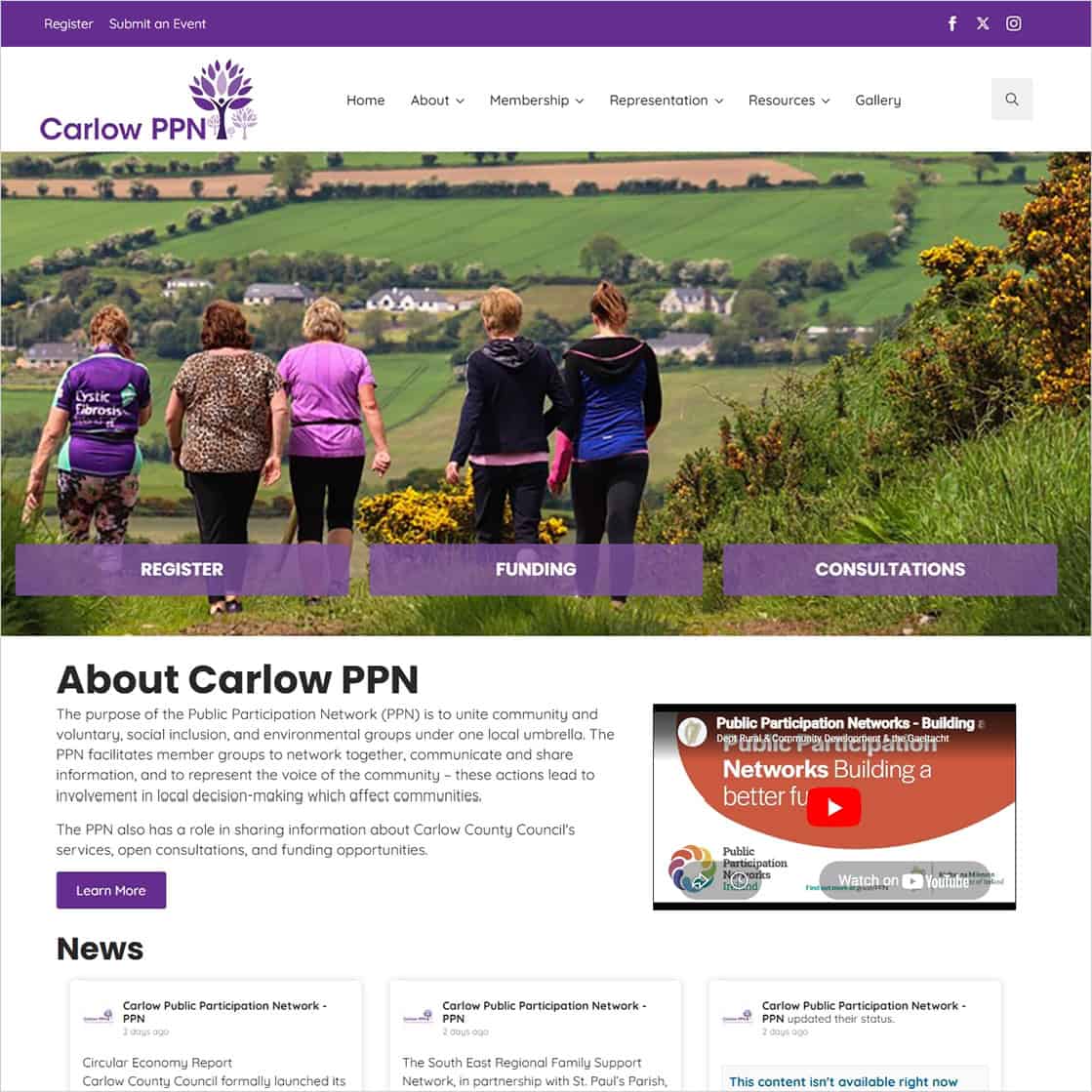
Carlow Public Participation Network brings together community and voluntary, social inclusion and environmental groups in the county. The Carlow PPN website we built provides a local example of organising information for several audiences.
Its navigation separates Membership, Representation and Resources. Visitors can find membership guidance, a members directory, funding information, event listings and an eBulletin archive. These are distinct routes into the network’s information rather than a single list of updates.
For another community organisation, the useful starting point is to identify its own recurring questions. Use those questions to decide what deserves a permanent page and what belongs in an event listing, news item or archive.
Explore the Carlow PPN website or read our Carlow PPN website case study for the project background.
If the website needs a membership application, contact form or event submission, decide who will receive it and what happens next. Give visitors clear instructions about the information requested and show a confirmation when a submission has been sent.
Agree which information will be public and which will remain within the organisation. If a form sends someone to an external service, explain that next step. Before launch, test a submission and confirm that it reaches the person or mailbox responsible for responding.
Assign responsibility for approving information, publishing updates and reviewing older pages. Keep a record of the organisation’s domain, hosting and website access arrangements so that a change of staff or committee does not interrupt routine updates.
Ask for a handover that covers the tasks your team will actually carry out, such as publishing an event or replacing a document. Clarify the ongoing costs and support scope. Technical maintenance and help with writing, uploading or changing content should be agreed separately, with any additional work quoted clearly.
Ask someone who has not worked on the project to try a few common tasks on a phone and a desktop. Watch where they hesitate, then use that feedback to improve labels or instructions.
If you are planning a website for a community or voluntary organisation in Carlow, send us an outline of your work, your main audiences and the information you need to publish. Include your existing website address if you have one, and let us know who will manage updates.
Explore our web design service in Carlow or contact Istech about your community website.